
FAQ
How can I add a driver?
-
Under Driver click "New",
-
Click the drop-down button and select your driver (You have to add them first under Profile - employee)
-
Click "Save Changes".
.png)
How can I delete a driver?
-
Under Driver click the X icon beside the driver.
-
On the pop-up window, enter the endorsement date.
-
Enter the Note of why this driver is being removed.
-
Click "Save".
-
Click "Save Changes"
.png)
.png)
.png)
How can I add a vehicle?
-
Under Vehicle click "New",
-
Click the drop-down button and select your vehicle (You have to add it first under Profile - vehicle)
-
Click "Save Changes".
.png)
How can I delete a vehicle?
-
Under Vehicle click the X icon below the vehicle.
-
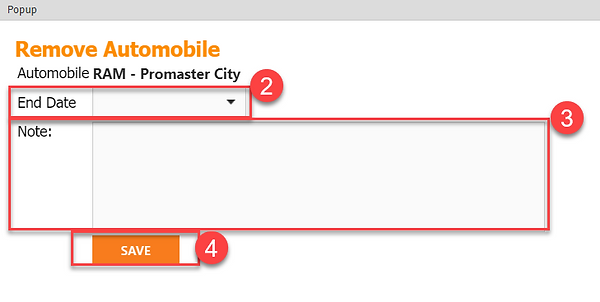
On the pop-up window, enter the endorsement date.
-
Enter the Note of why this driver is being removed.
-
Click "Save".
-
Click "Save Changes"
.png)
.png)
.png)